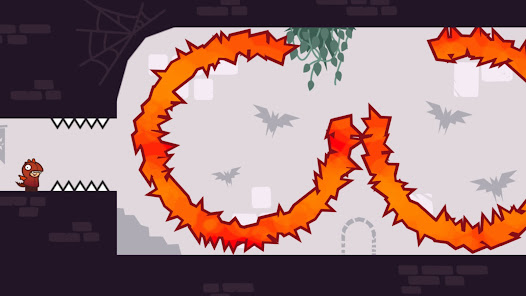
Tricky Castle: Trap Adventure players can choose from 120 unique levels, each packed with challenging puzzles designed to test their wits. Players will need to use their wits and intelligence to figure out how to unlock 12 locks and find the right path through the castle of illusion to rescue the princess and escape.
The increasing difficulty of the puzzles throughout the game ensures that players never get bored. One of the attractions of the game is that players must solve puzzles to open hundreds of doors and rescue the girl. To progress through the game, players will need to do this. Each door in the game represents a difficulty or puzzle that must be solved before the player can continue. Incorporating this element into the game increases complexity and keeps players engaged and interested.
What is Tricky Castle MOD APK? A Thrilling Puzzle Adventure with Unlimited Perks
Tricky Castle MOD APK is a modified version of the original Tricky Castle game, where you solve clever puzzles, think outside the box, and overcome a range of challenges to escape the castle and save the princess. While the original game requires effort to unlock hints and features, the MOD APK version eliminates these limitations by offering unlimited hints, resources, and premium unlocked content, allowing you to fully immerse yourself in the game without interruptions.
This version is ideal for players who want to enjoy a seamless and enhanced puzzle-solving experience without having to worry about ads, limited hints, or premium content locked behind paywalls.
How to Download and Install Tricky Castle MOD APK
Downloading and installing Tricky Castle MOD APK is simple and straightforward. Here’s how you can get started:
- Enable Unknown Sources: Go to your device’s Settings > Security and enable “Unknown Sources” to allow installations from third-party sources.
- Download the APK File: Search for “Tricky Castle MOD APK download” from an1 website and download the latest version of the APK file.
- Install the Game: Locate the downloaded APK file in your device’s Downloads folder and tap on it to start the installation process.
- Launch and Play: Once installed, open the game and enjoy premium unlocked features like unlimited everything, unlimited hints, and no ads.
Features of Tricky Castle MOD APK: Why It’s the Ultimate Puzzle Game
The MOD APK version of Tricky Castle includes several exciting features that make it stand out from the original version. Let’s take a closer look at what this modified version has to offer:
Premium Unlocked
Tricky Castle MOD APK unlocks all premium levels and features, giving you access to every aspect of the game without having to spend money. This means you can explore all the tricky levels and challenges that the castle has to offer right from the start.
Unlimited Hints
Stuck on a tricky puzzle? With unlimited hints, you’ll never have to worry about getting stuck on a level again. This feature ensures that you can progress through the game at your own pace, even when the puzzles get challenging.
Unlimited Everything
The MOD APK version provides unlimited resources, allowing you to fully enjoy the game without worrying about running out of coins or other in-game currencies.
No Ads
Say goodbye to annoying ads! Tricky Castle MOD APK removes all advertisements, giving you a smooth and uninterrupted gaming experience. You can focus solely on solving puzzles and progressing through the game without any distractions.
Challenging and Creative Puzzles
The MOD APK retains all the creative puzzles and unexpected traps that make Tricky Castle such a fun and engaging game. From cleverly hidden clues to mind-bending challenges, every level will test your problem-solving skills.
Why Tricky Castle MOD APK is the Best Way to Experience the Game
Freedom to Explore
With all premium content unlocked, you can explore every level and challenge the game has to offer without restrictions. This gives you the freedom to enjoy the full game without worrying about progression barriers.
Seamless Gameplay
The absence of ads ensures that you can fully immerse yourself in the game without interruptions. Whether you’re solving puzzles or navigating tricky traps, the ad-free experience allows for seamless gameplay.
Perfect for All Players
Whether you’re a casual gamer or a puzzle enthusiast, Tricky Castle MOD APK caters to all skill levels. With unlimited hints and resources, you can enjoy the game at your own pace while still challenging yourself with its creative puzzles.
Enhanced Accessibility
The MOD APK version makes the game more accessible by removing paywalls and providing unlimited resources. This ensures that players can focus on enjoying the game rather than worrying about in-game purchases or limitations.
How Tricky Castle MOD APK Enhances Your Puzzle-Solving Experience
Unlimited Hints for Stress-Free Gameplay
One of the standout features of Tricky Castle MOD APK is the inclusion of unlimited hints. This feature is particularly useful for players who enjoy solving puzzles but occasionally need a nudge in the right direction. With unlimited hints, you can tackle even the most challenging levels with confidence.
Ad-Free Experience for Maximum Immersion
The removal of ads ensures a smooth and enjoyable gaming experience. You won’t have to deal with pop-ups or banner ads disrupting your focus while solving puzzles.
Explore Every Level with Premium Unlocked
With premium features unlocked, you can dive straight into any level or challenge without having to wait or complete specific requirements. This allows you to experience the game’s full potential right from the start.
Unlimited Resources for Endless Fun
The MOD APK version provides unlimited resources, giving you the freedom to experiment with different strategies and solutions without worrying about running out of coins or in-game items.
Tips to Master Tricky Castle with the MOD APK Version
Use Hints Wisely: While you have unlimited hints, try to solve puzzles on your own first to fully enjoy the challenge. Use hints only when you’re truly stuck.
Explore Every Corner: Tricky Castle’s puzzles often include hidden clues, so be sure to thoroughly explore each level for secret doors, switches, or items.
Think Outside the Box: The game is known for its creative puzzles that require unconventional solutions. Don’t be afraid to try new approaches!
Take Your Time: With unlimited everything and no ads, there’s no rush to complete levels. Take your time to fully enjoy the game’s unique puzzles and challenges.
Why You Should Download Tricky Castle MOD APK
Tricky Castle MOD APK is the ultimate way to experience this creative and challenging puzzle game. With features like premium unlocked, unlimited hints, unlimited everything, and no ads, the MOD APK version offers a superior gameplay experience compared to the original. Whether you’re a casual player looking for a fun way to pass the time or a puzzle enthusiast seeking a new challenge, Tricky Castle MOD APK has something for everyone.
Conclusion: Tricky Castle MOD APK is the Ultimate Puzzle Game
Tricky Castle MOD APK provides an enhanced gaming experience that combines challenging puzzles with unlimited resources and premium features. With its ad-free gameplay, unlimited hints, and everything unlocked, this modified version ensures that you can fully immerse yourself in the game without any limitations.
Download Tricky Castle MOD APK today and embark on a puzzle-solving adventure like no other! Save the princess, escape the castle, and challenge your mind with the game’s creative and tricky levels.
Tricky Castle MOD APK 1.6.1 Premium Unlocked Download For Android
Tricky-Castle-mod-apk-premium-unlocked-1.6.1.apk