Screenshots


About This App
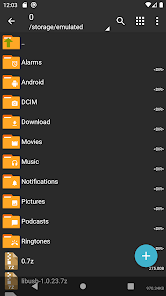
ZArchiver Donate – application for working with archives, with a functional interface and all the necessary options. The program will help you create and unzip files, as well as move, rename and delete data. In addition to the basic interactions of all known file formats and extensions, you can create polyatomic and password-protected files. ZArchiver – is a program for managing archives. It has a simple and functional interface. The application does not have permission to access the Internet, so it cannot transmit any information to other services or people. FEATURES: – Create the following types of files – Unzip the following types of files – View file content – Create and unzip password protected archives – Edit files – Create and unzip multipart archives – Partial decompression of the file – Open compressed files – Open an archive file from mail apps – Extract split files Supported Android Versions:- Jelly Bean(4.1-4.3.1)- KitKat (4.4-4.4.4)- Lollipop (5.0-5.0.2) – Marshmallow (6.0-6.0.1) – Nougat (7.0-7.1.1) – Oreo (8.0-8.1) – Pie (9.0) – Android 10 – Android 11
Download Links
How to install ZArchiver Donate MOD APK 1.0.10
ZArchiver Donate 1.0.10 is a Tools app by ZDevs. The download file is ZArchiver-Donate-MOD-APK-1.0.3.apk. On Google Play the original ZArchiver Donate has a 4.6-star rating from 4.43K reviews and 50,000+ installs.
- Tap the first download link above to get
ZArchiver-Donate-MOD-APK-1.0.3.apk. - If the original ZArchiver Donate from Google Play is installed (
ru.zdevs.zarchiver.pro), uninstall it first. The MOD uses the same package name but a different signature, so Android will not install it over the original. - Allow the installation: Settings > Apps > Special app access > Install unknown apps, then enable it for your browser or file manager.