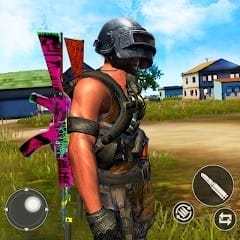
Screenshots


About This App
Description:
Do you like survival shooter games with great graphics and fascinating stories?
Tegra is a first person shooter in which you have to shoot down hordes of monsters and zombies from another world. This survival shooter tells the story of a magical disaster that occurred as a result of mixing several worlds. Portals from the world of Tegra have opened to our world, through which many magical creatures and zombies have penetrated. Fight for survival in a huge open world. Choose the best shooters to fight the monsters that are coming your way.
Features:
* Various weapons to fight zombies, mobs and many other enemies.
* Creating and building. Unique craft system * acquire resources, hunt, find many useful items or weapons. Over 150 recipes for making.
* # 1 Zombie survival shooter.
* One of the best survival simulators you’ve ever seen.
* Explore the world and collect resources.
* Fascinating story.
Supported Android Versions:-
Jelly Bean(4.1–4.3.1)- KitKat (4.4–4.4.4)- Lollipop (5.0–5.0.2) – Marshmallow (6.0 – 6.0.1) – Nougat (7.0 – 7.1.1) – Oreo (8.0-8.1) – Pie (9.0)
Download Links
Additional Information
Developer
Avega Inc
Version
1.8.65
Release / Update Date
N/A
Rating
4.5
How to install Tegra Crafting and Building Survival Shooter MOD APK 1.8.65
Tegra Crafting and Building Survival Shooter 1.8.65 is an Action game by Avega Inc. The download file is Tegra-v1.6.19-mod.apk (912 MB). On Google Play the original Tegra Crafting and Building Survival Shooter has a 4.5-star rating from 63.2K reviews and 5,000,000+ installs.
- Tap the first download link above to get
Tegra-v1.6.19-mod.apk(912 MB). - Make sure your phone has about 2.23 GB of free storage: Android needs extra room to unpack the 912 MB file during installation.
- If the original Tegra Crafting and Building Survival Shooter from Google Play is installed (
com.avegagames.magic.craft.survival), uninstall it first. The MOD uses the same package name but a different signature, so Android will not install it over the original. Before uninstalling, link your Tegra Crafting and Building Survival Shooter progress to Google Play Games or the account option in the game settings so you can restore it.