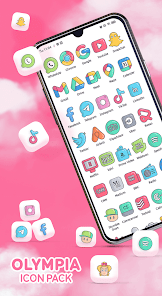
Screenshots

About This App
Currently, in the world, almost many people use smartphones. Along with its development, the accessories that come with it are also developed to make the phone more beautiful, such as phone cases, tempered glass, etc. It is beauty on the outside, but also with beauty on the inside as you open the phone and use it. it’s?? Therefore, the Selene Icon Pack app was born with the purpose of making those icons more interesting. We recommend setting the Selene icon pack size to 120-130% in the launcher settings.
FEATURES:
• Icon resolution: 192 x 192 px
• Suitable for dark, colorful and light wallpapers and themes
• Alternative icons for many popular apps
• Dynamic calendar icon
• Icon masking without theme
• Folder icons (must be applied manually)
• Miscellaneous icons (you must apply them manually)
• Search and display of icons
• Tap to send icon requests
• cloud wallpapers
Supported Android Versions:-
Jelly Bean(4.1-4.3.1)- KitKat (4.4-4.4.4)- Lollipop (5.0-5.0.2) – Marshmallow (6.0-6.0.1) – Nougat (7.0-7.1.1) – Oreo (8.0-8.1) – Pie (9.0) – Android 10 – Android 11
Download Links
Mod Info
- patched
How to install Selene Icon Pack MOD APK 2.9.7
Selene Icon Pack 2.9.7 is a Personalization app, and this MOD version comes with patched. The download file is Selene_v30.20.41_P.apk (40 MB).
- Start the download of
Selene_v30.20.41_P.apkusing the button above (40 MB). - Make sure your phone has about 110 MB of free storage: Android needs extra room to unpack the 40 MB file during installation.
- If the original Selene Icon Pack from Google Play is installed (
cs14.pixelperfect.iconpack.selene), uninstall it first. The MOD uses the same package name but a different signature, so Android will not install it over the original.