


Screenshots


About This App
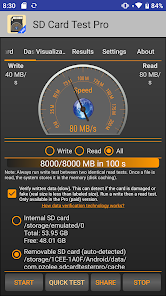
SD Card Test Pro APK – SD speed testing instrument! The storage formats eMMC and UFS may be used with microSD, SDHC, and SDXC cards.It is possible that the app will not be able to directly access the SD card if it has been formatted as adoptable storage. In such scenario, you may either change the install storage to the adoptable storage or format the storage as portable storage. Alternatively, you can relocate the app to the adoptable storage.On the very first tab, titled “Dashboard,” there is a speedometer that displays the current speed, and on the very next tab, titled “Visualization,” there is a graph that displays both the current speed and the average speed.
FEATURES:
Measure the speed of your external (removable) SD card
Measure the speed of your internal storage
Verify written data: damaged or fake card detection
Read/write tests using several different combinations.
Customized benchmarks
Show storage type: eMMC, UFS 2.0 and 2.1 or higher
Show class: Class 2, Class 4, Class 6, Class 10, UHS-I, UHS-II and UHS-III
Detecting storage type and class
Supporting several file systems like ext4, exFAT or FAT/FAT32.
Support portable and adoptable storage as well
Download Links
Mod Info
- paid
- pro
How to install SD Card Test MOD APK 1.9.3
SD Card Test 1.9.3 is an Uncategorized app, and this MOD version comes with paid, pro. The download file is SD-Card-Test.
- Tap the first download link above to get
SD-Card-Test. - If the original SD Card Test from Google Play is installed (
com.pzolee.sdcardtesterpro), uninstall it first. The MOD uses the same package name but a different signature, so Android will not install it over the original. - Give your browser permission to install apps: Settings > Apps > Special app access > Install unknown apps > choose your browser > Allow.
























