Screenshots


About This App
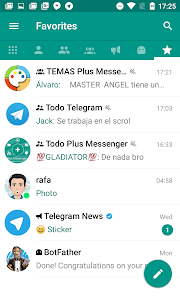
It can be said that Plus Messenger is one of the messaging tools that many users choose to use. There are many reasons for stating this, but among them it can be said that you can display tabs on your screen. Users can categorize message tabs in the mailbox so that they can be easily identified to read and reply to messages accordingly. They can be favorites, unread messages or group messages, and will be clearly categorized according to their layout. Even with this app, you can completely remove unnecessary tabs.
Download Links
Mod Info
- Optimized No ADS
Additional Information
Developer
rafalense
Version
12.5.1.0
Release / Update Date
Mar 13, 2026
Rating
3.8
How to install Plus Messenger Telegram Plus MOD APK 12.5.1.0
Plus Messenger Telegram Plus 12.5.1.0 is a Communication app by rafalense, and this MOD version comes with Optimized No ADS. The download file is Plus-Messenger-12.5.1.0-MOD-APK-Optimized-No-ADS.apk (67 MB) and runs on Android 5.0 or newer. On Google Play the original Plus Messenger Telegram Plus has a 3.8-star rating from 879K reviews and 50,000,000+ installs.
- Start the download of
Plus-Messenger-12.5.1.0-MOD-APK-Optimized-No-ADS.apkusing the button above (67 MB). - Make sure your phone has about 170 MB of free storage: Android needs extra room to unpack the 67 MB file during installation.
- If the original Plus Messenger Telegram Plus from Google Play is installed (
org.telegram.plus), uninstall it first. The MOD uses the same package name but a different signature, so Android will not install it over the original.