Screenshots





About This App
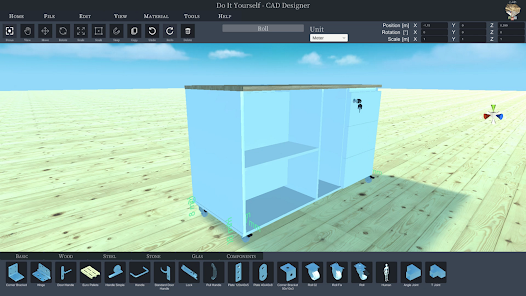
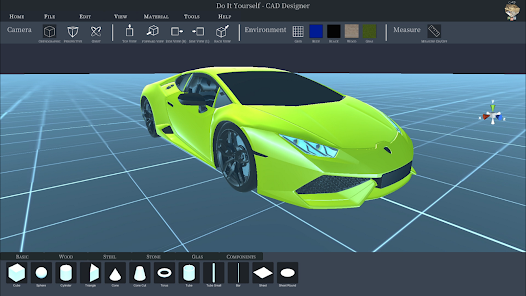
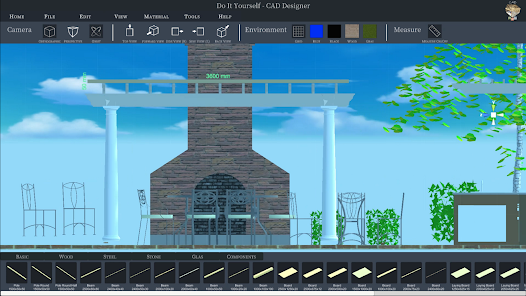
DIY CAD Designer has numerous libraries so you can easily drag and drop wooden beams, boards, sheets, rods and much more into your 3D scene to build your project. You can change components quickly and easily with editing features. Rotate, scale, position or copy your components. Choose between imperial [feet] or metric [m] measurement system. You can change your view with the press of a button, either orthogonal or perspective, depending on the app. Quick viewing angles such as top view, front view or side view are also possible. With the 3D sizing system you can very quickly read all the information you want about your construction. With the photo feature, you can create and share high-resolution images of your project. So, what are you waiting for? Download DIY CAD Designer now and make the most of it!
Download Links
Additional Information
Developer
Unknown Developer
Version
N/A
Release / Update Date
N/A
Rating
4.0
How to install DIY CAD Designer MOD APK 0.9
DIY CAD Designer 0.9 is a Productivity app. The download file is DIY-CAD-Designer-v0.9 - Mod.apk.
- Tap the first download link above to get
DIY-CAD-Designer-v0.9 - Mod.apk. - If the original DIY CAD Designer from Google Play is installed, uninstall it first. The MOD uses the same package name but a different signature, so Android will not install it over the original.
- Give your browser permission to install apps: Settings > Apps > Special app access > Install unknown apps > choose your browser > Allow.